Pronto Team Communication
- 3.9
- Rating
- 100.00K
- Installs
- Free
- Price

 Analysis by App-foxy
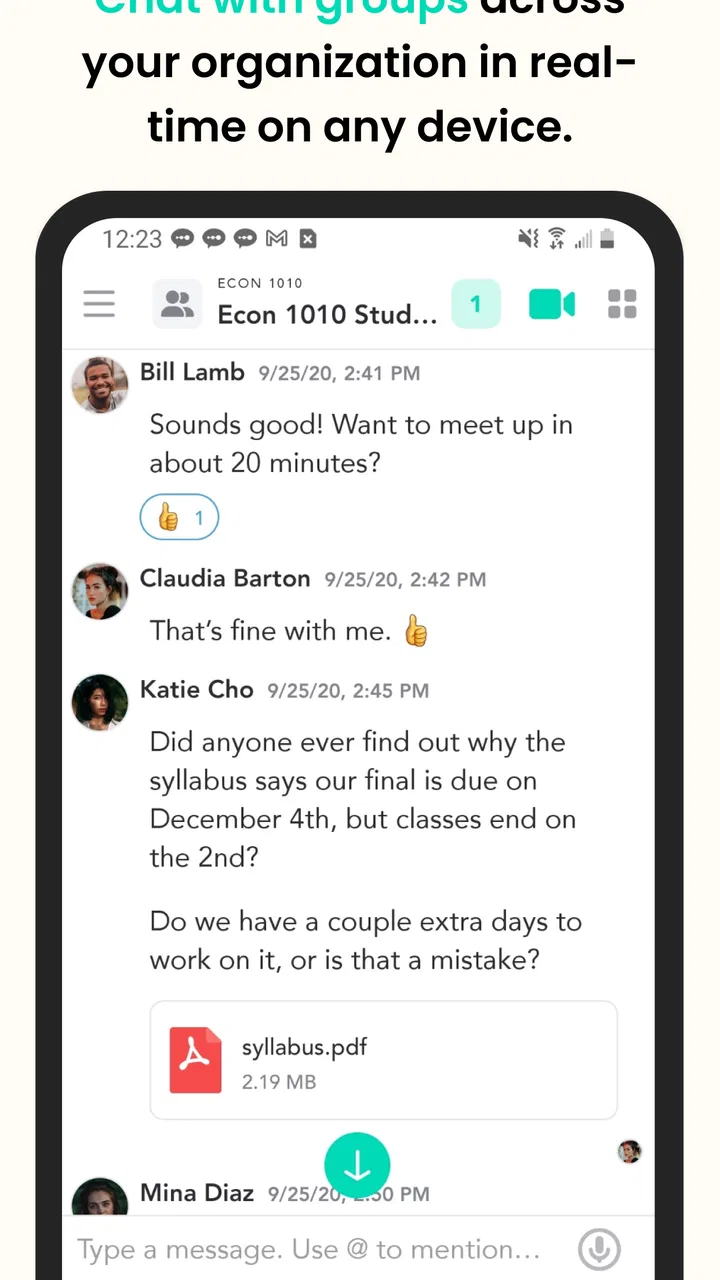
Choosing a group communication app is less about finding the longest feature list and more about finding the right amount of structure for the people you actually need to reach. I approached Pronto Team as a practical communication tool for small groups, where a quick written exchange and a face-to-face conversation may need to happen in the same place. Its store summary describes group text and video chat, while its short description identifies it as Pronto Team. That combination gives the app a clear purpose: bring a team conversation together instead of making everyone jump between separate messaging and video services.
Pronto Team is a free communication app from Hitlabs, aimed at an Everyone audience. It has been available since July 14, 2017, and the current version is 7.0.7 for devices running Android 8.0 or later. Those details matter if you are installing it on an older phone or recommending it to a mixed group. I also found that it has passed the early-experiment stage: the app has more than 100 thousand installs, with an average rating of 3.9 from around 228 ratings and 64 written reviews. That is not a guarantee that every group will love it, but it does suggest that people are using it for a real communication need rather than treating it as a novelty.
How I would decide whether Pronto Team fits
My first decision criterion is the shape of the group. Pronto Team makes more sense when several people need to stay connected around a shared activity, project, class, club, family plan, or informal team. It is less compelling if you only need one-to-one messaging or if your organization already has a mature collaboration system that everyone understands. The app’s central idea is group communication, so its value depends on whether the group benefits from having a common conversation space.
You May Also Like

 Blood Strike: 2.5 Anniversary
Blood Strike’s Loadouts Turn Every Drop Into a Tactical Gamble
A close look at Blood Strike’s custom loadouts: how fast access to signature weapons reshapes its battle royale rhythm, rewards preparation, and narrows the gap between fights.

 Pandora - Music & Podcasts
Pandora’s Music Is Easy to Start, but Harder to Recover
Pandora’s strength is its low-effort path from a seed to a station. Its weak spot is how much confidence it asks you to place in connection, setup, and quiet recovery.

 8 Ball Pool
 Is Built on Rivalries, Rematches, and Routine
A close look at the rivalries, rematches, shared routines, and unanswered safety questions that turn a quick pool match into a persistent mobile community.

 Samsung Music
’s Quiet Strength Is Playing What You Already Own
Its reach comes less from spectacle than from dependable access to a personal library. That simplicity is both the app’s strongest retention engine and its ceiling.

 AccuWeather: Weather Radar
AccuWeather Review: A Quick, Clear Forecast for Everyday Decisions
For everyday plans, the best forecast is the one you can understand quickly. AccuWeather makes rain timing, radar, and local conditions easy to act on, with a few trade-offs.

 Hill Climb Racing
Why Hill Climb Racing Still Turns Crashes Into One More Run
A tiny car, a bumpy hill and one more upgrade: Hill Climb Racing keeps resurfacing because its simple chaos makes every near-miss feel personal.
More From Our News Desk
View All News


The second criterion is how often the group changes between text and video. Some services are excellent at messaging but make video feel like a separate event. Others are built primarily for meetings and are awkward for quick written updates. Pronto Team is interesting because its identity sits between those categories. If your group needs to post a short update, clarify a detail, and then talk through something together, keeping those activities within one communication app can reduce the mental overhead of switching tools.
I would also consider the group’s tolerance for setup. A communication app is only useful when people actually open it and respond. Before choosing it for a busy team, I would ask whether everyone is comfortable creating or joining the relevant group, checking messages regularly, and using video when needed. The app may be technically suitable, but adoption is a social problem as much as a software problem. A simpler familiar messenger can still win if nobody wants to learn another place to communicate.
Device compatibility is another practical filter. The Android requirement is 8.0 or later, so I would check the oldest phone in the group before making it the default channel. This is especially important for families, volunteer groups, and community teams where members may use very different devices. A single incompatible phone can force the group back to ordinary text messages, defeating the reason for adopting a dedicated app.
What the combined text and video approach changes
In everyday use, the biggest potential advantage is continuity. A group can begin with written context instead of immediately scheduling a call. Someone can explain the issue, others can react, and a video conversation can be used when text stops being efficient. That is a better workflow than starting a meeting for every small question, while still leaving room for a richer conversation when a written thread becomes confusing.
For example, imagine a volunteer group preparing a local event. One person can post a change to the arrival plan, another can ask about equipment, and the group can move to video when the responsibilities become too complicated to settle through short messages. The useful part is not merely having two communication modes; it is being able to choose the lighter mode first and escalate only when necessary. That can protect everyone’s time.
A similar pattern works for a family coordinating travel or a small study group reviewing a difficult topic. Text is convenient when people are in different places or available at different times. Video is useful when tone, explanation, or visual discussion matters more than speed. I would not treat the app as a replacement for a full project-management system, but I can see its appeal as a shared room for conversation.
The practical strength is the handoff from text to video without changing the group’s communication context. That is more useful than a generic promise of “team chat” because it addresses a common friction point: written messages are efficient until they are not, and meetings are powerful until they become unnecessary.
Small-group workflows that make the app more useful
One useful habit is to keep the first message in a discussion focused on the decision or question, rather than mixing background, opinions, and next steps together. In a group communication app, clarity is a feature created by the users. I would write the immediate question first, add the needed context beneath it, and use a video conversation only if the group cannot reach a clear answer in text. This keeps the app from turning every minor issue into a meeting.
A second habit is to agree on what deserves a video conversation. Without that agreement, some members may expect rapid calls while others treat the group as an asynchronous message board. Pronto Team can support both styles, but it cannot resolve that social mismatch by itself. A simple rule such as “use text for updates and video for decisions that need discussion” gives the group a shared rhythm.
A third insight is that the app may be most valuable for groups that currently split their conversations across several tools. If one person sends an update by text, another posts a related detail in a separate messenger, and the actual discussion happens in a video service, the information becomes scattered. Bringing the communication into one app can make the group easier to follow. The trade-off is that everyone must consistently use the new channel; partial adoption creates another layer rather than removing one.
I would also create a lightweight routine around important conversations. Before starting video, post a sentence explaining the purpose of the call. Afterward, summarize the decision in text. That workflow makes the written side useful even for people who could not join live. It is a particularly sensible approach for mixed schedules, because the video conversation handles nuance while the message preserves the outcome.
Where Pronto Team feels most convincing
I think Pronto Team is strongest for informal or semi-organized groups that need more than a casual message thread but less than a large enterprise platform. A neighborhood committee, a small club, a family planning a shared activity, or a compact project team could benefit from a focused communication space. These groups often need a combination of quick coordination and occasional face-to-face discussion, but they may not want the administration associated with a heavier workplace suite.
The free price also lowers the barrier to trying it. That does not make adoption automatic, but it means the initial decision can focus on fit rather than a subscription commitment. For a small group, I would test it with one real communication cycle instead of judging it from a feature checklist: start with a written update, handle a question, try a video conversation, and see whether the group naturally returns to the app afterward.
The Everyone content rating makes it easier to consider for broad household or community use. I would still apply normal judgment about what a group shares and who is invited, because an age label does not replace sensible communication habits. The rating simply makes the app less restrictive as a general-purpose option for mixed audiences.
Its history is another modest positive. An app that has been available since 2017 and has reached over 100 thousand installs has had time to establish a recognizable purpose. I would not confuse longevity with flawless execution, and the 3.9 average shows that experiences are mixed rather than universally enthusiastic. Still, it is enough usage to make a trial feel reasonable for someone searching specifically for group text and video communication.
Where a different category may fit better
I would choose a conventional messaging app instead when the group mainly exchanges short personal updates and rarely needs video. Familiarity often matters more than a specialized workflow. If everyone already responds quickly in an existing messenger, moving them to Pronto Team may create more friction than value. The dedicated group-and-video focus becomes worthwhile only when the current arrangement feels fragmented or when video is a regular part of the conversation.
A meeting-first video platform may be better for scheduled presentations, formal calls, or situations where the main activity is a live session. Pronto Team’s appeal is the blend of text and video, not the assumption that every interaction should look like a meeting. If your requirements center on structured online meetings, presentation controls, or a formal conference routine, I would compare those needs separately rather than assuming a team chat app is enough.
For larger organizations, a full collaboration suite may be the safer choice. Such products typically organize communication around broader workplace processes, while Pronto Team is easier to understand as a focused group conversation tool. I would not select it as the sole system for a complex operation that needs extensive document handling, formal task tracking, or multiple layers of administration. That would be asking a communication app to become an entire workplace environment.
There is also a privacy and policy decision that every group should make before sharing sensitive material. I would avoid treating any general communication app as the place for confidential records, financial details, or information that requires a specialized compliance process unless the responsible organization has reviewed the app for that purpose. This is not a criticism unique to Pronto Team; it is a reminder that convenience and governance are different questions.
The real cost of moving a group
The monetary cost is simple because Pronto Team is free. The more important cost is coordination. Someone has to introduce the app, explain why the group is moving, make sure everyone can install it, and decide what happens to the old conversation. If that transition is handled casually, the group may end up checking two apps and missing messages in both.
I would make the switch around a clear starting point rather than trying to recreate every old conversation. Post a short message in the existing channel explaining the move, choose a date for new discussions to begin in Pronto Team, and keep the old channel available for reference. This reduces confusion and avoids wasting time copying irrelevant history. The goal is not to preserve every message; it is to establish one place for future communication.
Before inviting everyone, I would test the complete path on the least powerful or oldest supported device in the group. Check installation, joining the group, sending a message, and entering a video conversation. This catches compatibility problems early and gives you a realistic sense of how smooth the experience will be for members who are less comfortable with apps.
Another switching cost is notification discipline. A group that moves from a familiar messenger may expect Pronto Team to behave exactly the same way. I would ask members to check their notification settings and agree on when video invitations are appropriate. If calls arrive unexpectedly during work, school, or family time, enthusiasm can disappear quickly. A small etiquette agreement is not bureaucracy; it protects the group’s willingness to keep using the app.
There is also a psychological cost to adding a new destination. People do not evaluate communication tools only by capability. They judge how often they must open them, how easy it is to find the relevant discussion, and whether the group’s messages feel worth the attention. That is why I would keep the initial group focused. A single useful conversation is a better introduction than a crowded space filled with unrelated posts.
Who should install it, and who should skip it
I would recommend Pronto Team to someone who wants a free, focused place for group text and video chat and who is willing to bring the whole group along. It is particularly suitable when text and live conversation are both important, but a large workplace platform would feel excessive. The app’s purpose is easy to explain, and that makes it a reasonable candidate for small teams, clubs, families, and community groups.
I would be more cautious if your group has already settled into a familiar messenger or if video is only an occasional afterthought. In that situation, the app may not solve a problem large enough to justify changing habits. I would also skip it as the main tool for a complex organization that needs a broad suite of operational features rather than a communication-focused space.
The rating of 3.9 is a useful signal to keep expectations balanced. I read it as a reason to try the app with a real group before making it mandatory, not as a reason to dismiss it. The right test is whether it reduces the number of places people need to check and whether the move from written discussion to video feels natural for your particular group.
My recommendation after weighing the trade-offs
My recommendation is conditional but positive: try Pronto Team when your main problem is the gap between group messaging and video conversation. Start with a small, active group and use it for a genuine task rather than a theoretical test. If members can exchange updates, resolve a question, and hold a useful video discussion without returning to several other apps, it has earned a place in your communication routine.
I would not recommend switching simply because the app is free or because every group appears to need video. A new communication channel creates work, and that work is justified only when it makes coordination easier. The strongest case is a group that currently loses context between messages and calls. The weakest case is a group that already communicates comfortably and has no recurring need for live discussion.
In my view, Hitlabs has positioned this app around a sensible everyday need: keeping a group conversation together while allowing the format to change. Its current version, 7.0.7, and support for Android 8.0 or later make a trial straightforward for compatible devices. I would approach it as a focused communication tool, not as a replacement for every productivity or meeting service.
If you invite people with a clear purpose, establish a simple text-versus-video routine, and test the experience on the group’s oldest supported phone, you will learn quickly whether it fits. For the right small team, Pronto Team is a practical middle ground between an ordinary group messenger and a heavyweight meeting platform. For everyone else, staying with the familiar alternative may be the more efficient decision.
FAQs for Pronto Team Communication
01What is Pronto Team Communication used for?
Pronto Team Communication is a workplace messaging app designed to help teams communicate through direct messages, group conversations, file sharing, and organized channels. It can be useful for businesses with employees working in different locations, field teams, customer support departments, and organizations that need a central place for quick updates instead of relying on scattered email threads or personal messaging apps.
02Can Pronto Team Communication be used for remote or field teams?
Yes. The app is particularly suited to teams that do not always work from the same office. Employees can use it to exchange messages, share images or documents, and keep up with team announcements while working remotely or in the field. However, the exact features available may depend on the organization’s account, administrator settings, subscription plan, and the permissions assigned to each user.
03Is Pronto Team Communication free to download and use?
Pronto Team Communication may be available to download without an upfront charge, but downloading the app does not necessarily mean that every feature is free. Access is commonly connected to an organization, workplace account, or service plan managed by an administrator. Before installing it, users should confirm whether their company already uses Pronto and check whether any paid features, account requirements, or usage limitations apply.
04What information or permissions does Pronto Team Communication require?
As a team communication platform, Pronto may request permissions needed for notifications, contacts, camera access, microphone use, photo or file sharing, and device storage. The precise requests can vary between Android and iOS and may depend on the features your organization enables. It is worth reviewing permissions carefully and allowing only those necessary for messaging, calls, attachments, and timely workplace alerts.
05Is Pronto Team Communication suitable for sensitive business conversations?
Pronto is intended for professional communication, but users should still follow their organization’s security and privacy policies before sharing confidential information. Account protection, administrator controls, retention rules, and encryption practices can vary according to the service configuration. Avoid sending highly sensitive data unless your employer has approved the platform for that purpose, and always use a strong password and device security.
Pros
- Fast team messaging keeps workplace conversations organized.
- Channels help separate projects
- departments
- and topics.
- File sharing makes it easy to exchange work documents.
- Push notifications help users respond to important updates quickly.
- Useful for teams needing communication beyond email.
Cons
- Some features may require a paid workplace subscription.
- Notification volume can become distracting in busy teams.
- The app is less useful without an active Pronto workspace.
- New users may need time to learn the channel structure.
- Performance can depend on the quality of the internet connection.

Pronto Team Communication
Gallery